Temperature not displayed on navbar #291

Reference in New Issue
Block a user
Delete Branch "%!s()"
Deleting a branch is permanent. Although the deleted branch may continue to exist for a short time before it actually gets removed, it CANNOT be undone in most cases. Continue?
Describe the bug
Once a temperature input is setup i can't have it display on navbar although i can collect a reading trough SSH terminal command cat w1_slave. What Am I missing here?
My configuration:
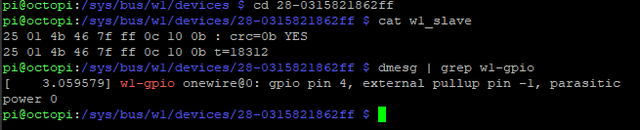
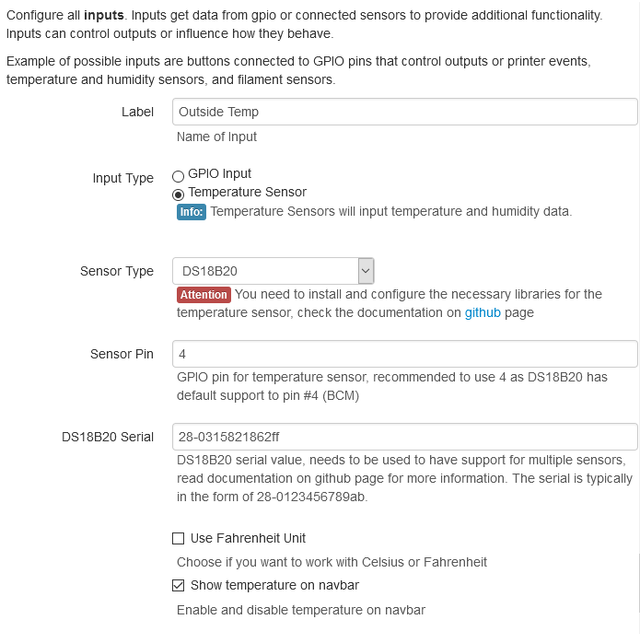

same here but with DHT22
Can you describe your exact hardware? How many sensors? any other GPIO?
Problem was solved by disabling SUDO option in advaned setting.
Christopher, Thanks for the Tip. I have been looking at Issue #288 and changing SUDO made no difference for me.
Just one sensor.
SUDO on or off make no difference.
Fresh install on an RPi 4 and I had the same issue. No other plugins installed as I tested. I was able to get temp/humidity in terminal but reported in the navbar only as 0. Temp would report as 32 if I switched to Fahrenheit, result of the conversion I expect. The sensor is a single DHT11 connected to GPIO 4. Disabling the SUDO option in advanced settings also solved the issue for me. Confirmed by turning SUDO back on and lost the temperature reporting again.
I was having this issue. Disabling SUDO worked for me. I think I can explain what is going on here and why disabling SUDO works for some people, and not for others.
When I first set up my sensor (AM2302) I was able to access in terminal as both the pi user and as root, but it displayed 0C in the navbar. At the same time, these messages began repeating in /var/log/auth.log on the host machine approximately every 10 seconds
May 18 18:05:23 octopi sudo: pam_unix(sudo:auth): conversation failedMay 18 18:05:23 octopi sudo: pam_unix(sudo:auth): auth could not identify password for [pi]When I disabled SUDO, the navbar display immediately began working and the messages stopped repeating in my auth log.
Oversimplified, sudo lets normal users run commands with root privileges. in a typical default config, it requires authentication at runtime. Traditionally this would be via a password. I didn't see an option to configure it for the plugin, but I didn't look too hard.
Why it works for some people with SUDO turned on
(speculation) Many people disable the auth requirement for the pi user, either intentionally because they don't need/want to auth every time they run a command or because a setup guide for something else told them to do it.
Why disabling SUDO fixes it for some people but not for others
Raspberry pi has a "gpio" group. In order to access gpio functions, the user needs to be a member of the gpio group, or be root.
Disabling sudo causes the plugin to run the commands as the user account octoprint is running in.
In the case of Octopi, this is going to be the pi user by default. At least on recent versions of Octopi, the pi user is already in the group. I'm pretty sure the pi user is also in the group by default on a fresh install of raspian, but I'm pretty sure this has not always been the case.
In the case of a custom install, it could be running as any user the person who set it up picked, who may not be in the gpio group.
Regardless of what user octoprint is running as, that user needs to be in the gpio group for it to work when sudo is disabled in the plugin.
Well after update to last Raspbian and OctoPrint versions, rechecking the configs without SUDO, disabling and rworking e-enabling Show temperature on navbar option on the enclosure plug-in now it seems to be working.