Temperature alarm not working and breaks reading temperature sensors #288

Reference in New Issue
Block a user
Delete Branch "%!s()"
Deleting a branch is permanent. Although the deleted branch may continue to exist for a short time before it actually gets removed, it CANNOT be undone in most cases. Continue?
Describe the bug
Once a temperature alarm is setup as input display of temperature sensors in enclosure tab is not working for any sensor. Also the set up alarm does not trigger.
To Reproduce
Expected behavior
a) Temperatures should be shown in tab independant of set up alarms
b) alarm should trigger upon reaching threshold
Additional context
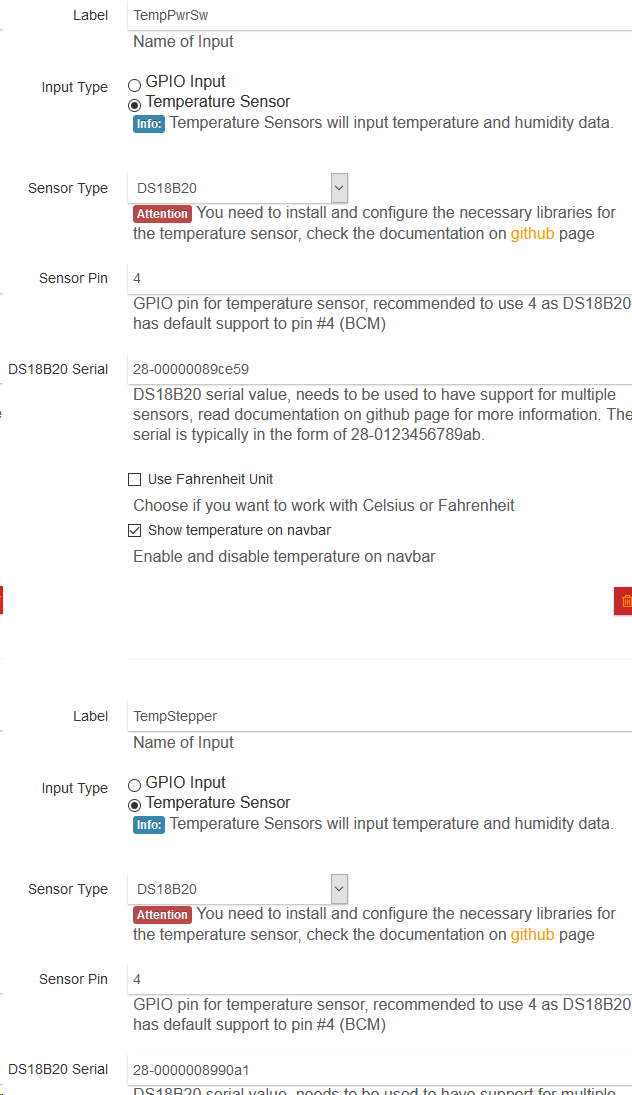
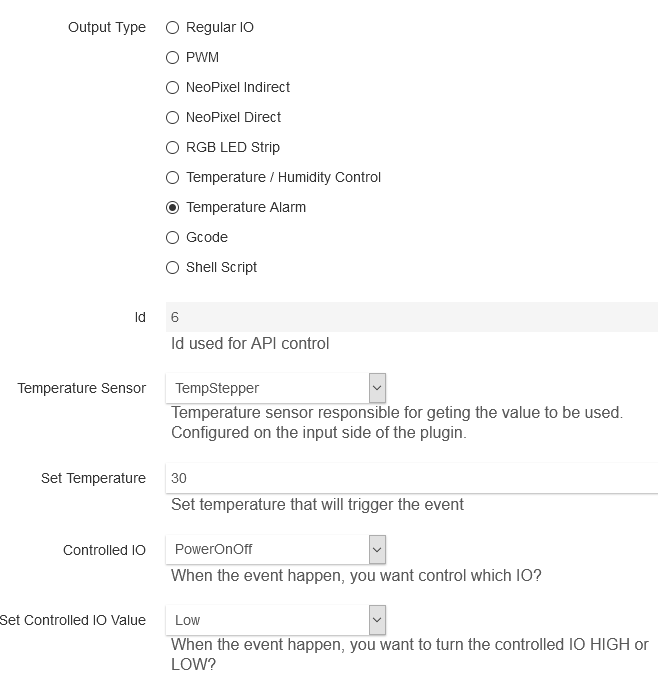
Working setup:
Adding Alarm breaks the functionality:
System
Octopi 0.17.0
Octoprint 1.3.12
Enclosure Plugin (4.13.1)
RaspPi 3B+
2x DS18B20 on I/O 4 as per wiki
log?
Logs attached.
I removed private info from the logs (IP, usr).
After setting up the alarm as above the temp readings are as follows


Alarm did not fire and turn the printer off as set up.
A lot of lines like this appear in the log
2020-02-07 10:30:18,312 - octoprint.plugins.enclosure - WARNING - An exception of type IndexError occurred on log_error. Arguments:
('pop from empty list',)
Setting up debug log in Enclosure extended settings only adds a couple of INFO lines:
2020-02-07 10:44:22,989 - octoprint.plugins.enclosure - INFO - Adding GPIO event detect on pin 23 with edge: 32
2020-02-07 10:44:23,065 - octoprint.plugins.enclosure - INFO - Adding PRINTER CONTROL event detect on pin 20 with edge: 32
2020-02-07 10:44:23,098 - octoprint.plugins.enclosure - INFO - Adding PRINTER CONTROL event detect on pin 21 with edge: 32
2020-02-07 10:44:23,101 - octoprint.plugins.enclosure - INFO - Adding GPIO event detect on pin 12 with edge: 32
2020-02-07 10:44:23,123 - octoprint.plugins.enclosure - INFO - Adding GPIO event detect on pin 16 with edge: 32
2020-02-07 10:44:23,145 - octoprint.plugins.enclosure - INFO - Adding GPIO event detect on pin 19 with edge: 32
2020-02-07 10:44:23,169 - octoprint.plugins.enclosure - INFO - Adding GPIO event detect on pin 26 with edge: 32
Sometimes SHIFT+R updates the temp in the web view but the alarm does not fire or applear in the log.
log_no-temp-alarm.log
log_temp-alarm.log
Victor, Super cool stuff. Retired now just hobbyist. My kids got me an ender3Dpro for christmas, Came across your enclosure plugin last week and have been testing on the bench. I am seeing the same Issue.
I have similar setup as described. 2 - DS18B20 installed but have more to test with if needed. Also currently have 1 SSR25DA relay installed but have more if needed for testing. I am currently running. Octoprint latest OS and has been updated. I am running on the Rasp Pi 3b+ but have 4b 4gig arriving ups later today. I will test on the Rpi 4b later today. I will also turn on temp log and take a look see.
I cat w1_slave on both and the seem to be function normal. I remove the Temp-alarm and function returns to the display. "http://192.168.100.100/#tab_plugin_enclosure"
Im still learning but open to Ideas, willing to help.
Got the Rpi4 today but didn't test with hardware yet. First I changed my names with no blank space and didn't seem to change. Initially I was running in Fahrenheit changed to Celcius and that made no difference.
I think there are 2 different issues.
First: If I set a Temperature-alert using the first of the 2 Temperature sensors it seems to function as designed but just never shuts down the GPIO relay. I have found that if I set the Temperature-alert to the second thermostat or the second sensor it hangs the Temp output to the UI or display. This also seems to hang the Temp check < set temp value function. Also adds WARNING to the log file.
Second: The end result of the {Temp check} grader than or less than {set temp value} is not sending GPIO change or maybe correct value to GPIO bus. Maybe
I turned on Debug and tried to capture I also added comments cag_octoprint.log see attached
Next, I will test on New Install, Now Hardware 4b, 2 new DS18B20, new Relay. And see if we get the same. Maybe then look at code but not really a programmer. You guys make it look so easy.
cag_octoprint.log.txt
but still not GPIO switching on Temperature-alarm.
high and Low settings make no change in log output Writing on GPIO: 16 value 1.
bash: Echo Value 1:0 in GPIO23 {value} turns SSR on and off
can I compile single file or need to reinstall?
Old dog, new trick, so took me a bit. Working but not really fixed. Properly.
I added 3 lines of debug in the init.py around line 830 (below)
Setting the value of val to zero. { GPIO.LOW if rpi_controlled_output['active_low'] else GPIO.HIGH }
Is always high even after changing the (set controlled IO value) both high and low.
val set to 0 seems to fix function. Sets the GPIO value always low even when below the set_tempature value. Manually switching On/Off with click in ui works. This may be a good thing
Even after the fire is out, I don’t want the electric coming back on. Problem if you Want opposite GPIO always low and switching high.
def handle_temperature_events(self):
for temperature_alarm in [item for item in self.rpi_outputs if item['output_type'] == 'temperature_alarm']:
set_temperature = self.to_float(temperature_alarm['alarm_set_temp'])
if int(set_temperature) is 0:
continue
linked_data = [item for item in self.temperature_sensor_data if
item['index_id'] == temperature_alarm['linked_temp_sensor']].pop()
sensor_temperature = self.to_float(linked_data['temperature'])
if set_temperature < sensor_temperature:
for rpi_controlled_output in self.rpi_outputs:
if self.to_int(temperature_alarm['controlled_io']) == self.to_int(
rpi_controlled_output['index_id']):
val = GPIO.LOW if rpi_controlled_output['active_low'] else GPIO.HIGH
self._logger.debug(“ cag - output value of val: %s“, val)
val = 0
self._logger.debug(“ cag - just a check output val: %s“, val)
self.write_gpio(self.to_int(rpi_controlled_output['gpio_pin']), val)
for notification in self.notifications:
if notification['temperatureAction']:
msg = ("Temperature action: enclosure temperature exceed " + temperature_alarm[
'alarm_set_temp'])
self.send_notification(msg)
Also need to add the second temperature sensor and debug display problem. (help im a bit lost)
Room Temp and Enclosure Temp.
Would also like to test second SSR and second Temperature_alarm and 3rd SSR for enclosure lighting plus a filament sensor.
Why is { val = GPIO.LOW if rpi_controlled_output['active_low'] else GPIO.HIGH } always high?
Having fun. Thanks
Added second Temperature sensor and all seem to function as normal even Alarm. Changed to fahrenheit No problem. When I set Temperature_Alarm to second sensor is when I get a failure. UI displays stored value. Also posts WARNING to log. WARNING seems to fail in values
something to do with reading the second sensor or
testing set_temperature > second sensor temp.
Maybe......
oops.... set < second
All new hardware all new software. Same 2 issues as above.
Hardware Raspi 4b Sandisk 128 10x
Latest OctoPI 0.17.0
2 X DS18B20
Octoprint 1.4.2
Octo_Enclosure 4.13.1
a.) Setting an Output Type, Temperature Alarm, to the second DS18B20 Thermostat caused Temp values in UI to display default. And Alarm does not work in this state.
b.) Setting an Output Type, Temperature Alarm. Then setting the “Set Controlled IO Value”
To high or low makes no difference. Always high.
Work around for a.) is to always alarm on the first DS18B20 Thermometer, only tested 2
Work around for b.) add to __init__py file Setting val=0 which is always low
around line 830 depending on version (see below)
Setting the value of val to zero. { GPIO.LOW if rpi_controlled_output['active_low'] else GPIO.HIGH }
Is always high even after changing the (set controlled IO value) both high and low.
val set to 0 seems to fix function. Sets the GPIO value always low even when below the set_tempature value.
@@ -1867,4 +1870,4 @@ def plugin_load():
plugin_hooks = {
"octoprint.comm.protocol.gcode.queuing" : plugin_implementation.hook_gcode_queuing,
"octoprint.plugin.softwareupdate.check_config": plugin_implementation.get_update_information