MAX31855 Compatibility issues #402

Open
opened 2021-02-17 20:43:21 +00:00 by sjgittins · 0 comments
sjgittins commented 2021-02-17 20:43:21 +00:00 (Migrated from github.com)

Running Octoprint on raspberry Pi 4, with some GPIO interface (PSU control) but using a supported temperature device from enclosure (MAX31855) I have exhausted all the troubleshooting steps and I am still unable to get a real temperature value. I have multiple raspberry pis, and I am able to get temperature data from MAX31855 on all of the raspberry pis, including the one that is dedicated to octoprint (via ssh, nano) using the same ports recommended in enclosure, but the temperature reads 0C or 32F meaning it is not recognizing the data. Screenshot and log provided.
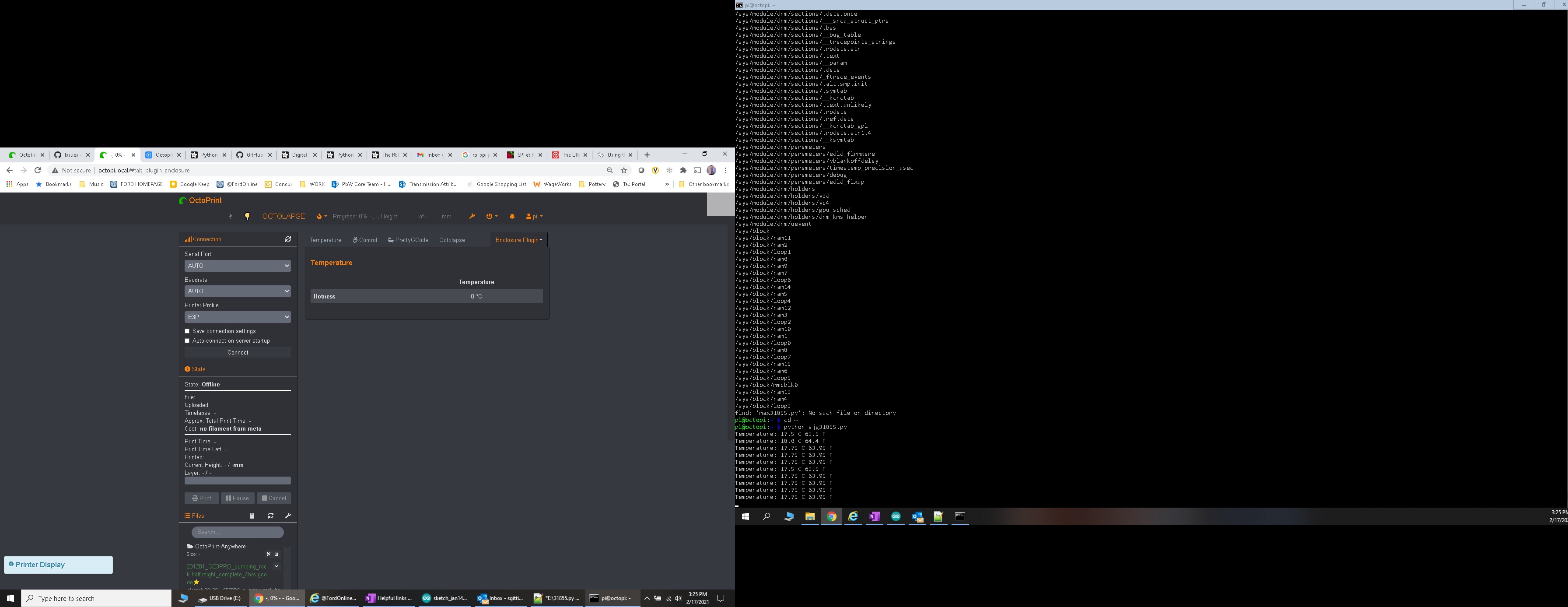
octoprint.log
210217_enclosure_temperature_issue

browser.user_agent: Mozilla/5.0 (Windows NT 10.0; WOW64) AppleWebKit/537.36 (KHTML, like Gecko) Chrome/88.0.4324.182 Safari/537.36
connectivity.connection_check: 8.8.8.8:53
connectivity.connection_ok: true
connectivity.enabled: true
connectivity.online: true
connectivity.resolution_check: octoprint.org
connectivity.resolution_ok: true
env.hardware.cores: 4
env.hardware.freq: 1500
env.hardware.ram: 1903312896
env.os.bits: 32
env.os.id: linux
env.os.platform: linux
env.plugins.pi_support.model: Raspberry Pi 4 Model B Rev 1.1
env.plugins.pi_support.octopi_version: 0.17.0
env.plugins.pi_support.throttle_state: 0x0
env.python.pip: 20.2.3
env.python.version: 3.7.3
env.python.virtualenv: true
octoprint.safe_mode: false
octoprint.version: 1.5.3

To Reproduce
Steps to reproduce the behavior:
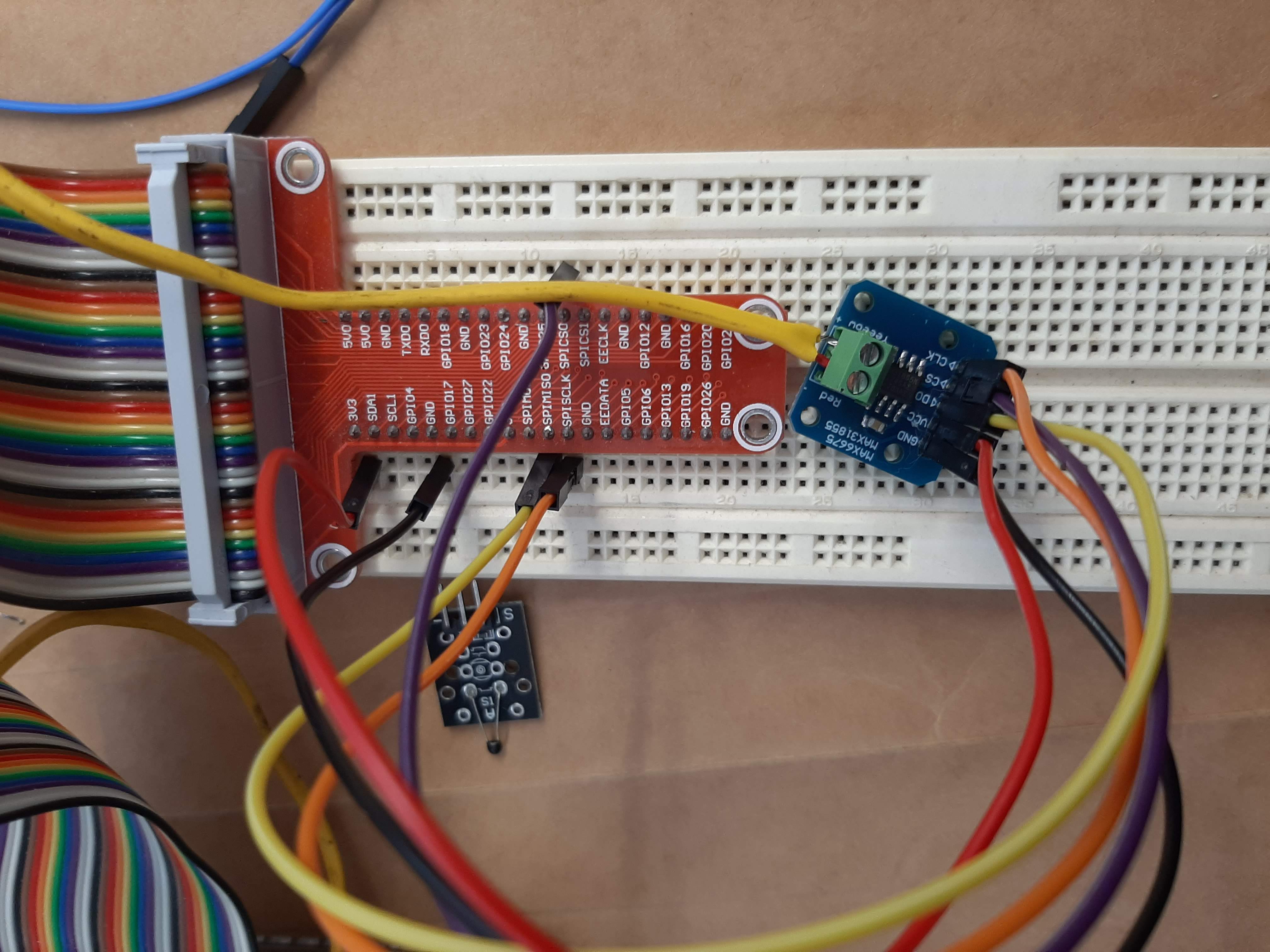
tried deleting enclosure, closing, rebooting, and all combinations. Cannot get the data thru on the enclosure plugin. I have 2 MAX31855s and both exhibit the same issue.
20210217_153801
I realize the photo attached is some knockoff MAX31855, but the temperature data is still valid and works thru the very basic code to run the MAX31855

import time
import board
import busio
import digitalio
import adafruit_max31855

spi = busio.SPI(board.SCK, MOSI=board.MOSI, MISO=board.MISO)
cs = digitalio.DigitalInOut(board.D24)

max31855 = adafruit_max31855.MAX31855(spi, cs)
while True:
tempC = max31855.temperature
tempF = tempC * 9 / 5 + 32
print("Temperature: {} C {} F ".format(tempC, tempF))
time.sleep(2.0)

Expected behavior
What do I need to modify to enable temperature? I tried for 2 days straight and I'm frustrated and not sure where else to look for help.

Additional context
Add screenshots of your settings screen, so I know how to recreate the data. Also enable the debug information under the advanced section of the plugin, reproduce the issue and attach the octoprint log here. Done.
octoprint.log

Running Octoprint on raspberry Pi 4, with some GPIO interface (PSU control) but using a supported temperature device from enclosure (MAX31855) I have exhausted all the troubleshooting steps and I am still unable to get a real temperature value. I have multiple raspberry pis, and I am able to get temperature data from MAX31855 on all of the raspberry pis, including the one that is dedicated to octoprint (via ssh, nano) using the same ports recommended in enclosure, but the temperature reads 0C or 32F meaning it is not recognizing the data. Screenshot and log provided. [octoprint.log](https://github.com/vitormhenrique/OctoPrint-Enclosure/files/5998469/octoprint.log) ![210217_enclosure_temperature_issue](https://user-images.githubusercontent.com/79226541/108264700-da9f2400-7135-11eb-8b56-f82735de898a.jpg) browser.user_agent: Mozilla/5.0 (Windows NT 10.0; WOW64) AppleWebKit/537.36 (KHTML, like Gecko) Chrome/88.0.4324.182 Safari/537.36 connectivity.connection_check: 8.8.8.8:53 connectivity.connection_ok: true connectivity.enabled: true connectivity.online: true connectivity.resolution_check: octoprint.org connectivity.resolution_ok: true env.hardware.cores: 4 env.hardware.freq: 1500 env.hardware.ram: 1903312896 env.os.bits: 32 env.os.id: linux env.os.platform: linux env.plugins.pi_support.model: Raspberry Pi 4 Model B Rev 1.1 env.plugins.pi_support.octopi_version: 0.17.0 env.plugins.pi_support.throttle_state: 0x0 env.python.pip: 20.2.3 env.python.version: 3.7.3 env.python.virtualenv: true octoprint.safe_mode: false octoprint.version: 1.5.3 **To Reproduce** Steps to reproduce the behavior: tried deleting enclosure, closing, rebooting, and all combinations. Cannot get the data thru on the enclosure plugin. I have 2 MAX31855s and both exhibit the same issue. ![20210217_153801](https://user-images.githubusercontent.com/79226541/108265270-8fd1dc00-7136-11eb-944b-488252dc49f2.jpg) I realize the photo attached is some knockoff MAX31855, but the temperature data is still valid and works thru the very basic code to run the MAX31855 import time import board import busio import digitalio import adafruit_max31855 spi = busio.SPI(board.SCK, MOSI=board.MOSI, MISO=board.MISO) cs = digitalio.DigitalInOut(board.D24) max31855 = adafruit_max31855.MAX31855(spi, cs) while True: tempC = max31855.temperature tempF = tempC * 9 / 5 + 32 print("Temperature: {} C {} F ".format(tempC, tempF)) time.sleep(2.0) **Expected behavior** What do I need to modify to enable temperature? I tried for 2 days straight and I'm frustrated and not sure where else to look for help. **Additional context** Add screenshots of your settings screen, so I know how to recreate the data. Also enable the debug information under the advanced section of the plugin, reproduce the issue and attach the [octoprint log](https://discourse.octoprint.org/t/where-can-i-find-octoprints-and-octopis-log-files/299) here. Done. [octoprint.log](https://github.com/vitormhenrique/OctoPrint-Enclosure/files/5998499/octoprint.log)
Sign in to join this conversation.
1 Participants
Notifications
Due Date
No due date set.
Dependencies

No dependencies set.

Reference: Gandalf/OctoPrint-Enclosure#402