Cannot use the same input pin for more than one output. #387

Open
opened 2021-01-24 11:08:27 +00:00 by gopgop9000 · 0 comments
gopgop9000 commented 2021-01-24 11:08:27 +00:00 (Migrated from github.com)

Description:

  1. When trying to have two outputs, one with Output Control and one with Printer Control, and both using the same input pin, neither of them work.
  2. When selecting two Output Controls, which in my case were GCODE commands, and using the same input only the higher output in the list runs.
    Including code snippets for more information.

Steps to reproduce the behavior:
Scenario 1:
Set an input to board pin 40 (other pins do not work either)
Set one output to Printer Control and select Print Cancel
Set the other to Output Control and select a script to execute in order to activate a buzzer. (Did not work even when script was not set)
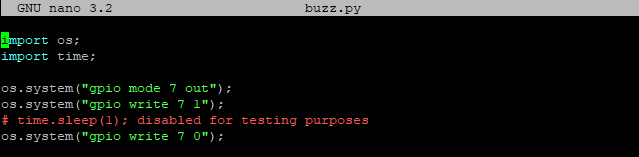
Script Code:
image

Press button and it does not do either function.

Scenario 2:
Set an input to board pin 7
Set one output to send GCODE commands to cool down the printer

M140 S0 ENTER
M104 S0 ENTER

Set the other output to heat up the printer

M140 S60 ENTER
M190 S60 ENTER
M104 S210 T0 ENTER
M109 S210 T0 ENTER

The first option runs, but not the second. (This was a test, not my intended process)

Expected behavior:
Scenario 1: Stop the print and activate the buzzer simultaneously
Scenario 2: Stop heating the printer and immediately heat up again (I tried testing this to check the terminal output)

buzz input
stop input
buzzer output

Trimmed the output due to unnecessary discord-remote plugin output when I was not testing the buttons.
output_trimmed.txt

Description: 1. When trying to have two outputs, one with Output Control and one with Printer Control, and both using the same input pin, neither of them work. 2. When selecting two Output Controls, which in my case were GCODE commands, and using the same input only the higher output in the list runs. Including code snippets for more information. Steps to reproduce the behavior: Scenario 1: Set an input to board pin 40 (other pins do not work either) Set one output to Printer Control and select Print Cancel Set the other to Output Control and select a script to execute in order to activate a buzzer. (Did not work even when script was not set) Script Code: ![image](https://user-images.githubusercontent.com/22566921/105628060-710a4f00-5def-11eb-916a-afb930efabb2.png) Press button and it does not do either function. Scenario 2: Set an input to board pin 7 Set one output to send GCODE commands to cool down the printer ``` M140 S0 ENTER M104 S0 ENTER ``` Set the other output to heat up the printer ``` M140 S60 ENTER M190 S60 ENTER M104 S210 T0 ENTER M109 S210 T0 ENTER ``` The first option runs, but not the second. (This was a test, not my intended process) Expected behavior: Scenario 1: Stop the print and activate the buzzer simultaneously Scenario 2: Stop heating the printer and immediately heat up again (I tried testing this to check the terminal output) ![buzz input](https://user-images.githubusercontent.com/22566921/105628362-491beb00-5df1-11eb-85b4-dd20f5a2ac70.PNG) ![stop input](https://user-images.githubusercontent.com/22566921/105628364-4ae5ae80-5df1-11eb-8a83-665385657128.PNG) ![buzzer output](https://user-images.githubusercontent.com/22566921/105628367-4caf7200-5df1-11eb-8c96-c3904012e29b.PNG) Trimmed the output due to unnecessary discord-remote plugin output when I was not testing the buttons. [output_trimmed.txt](https://github.com/vitormhenrique/OctoPrint-Enclosure/files/5862046/output_trimmed.txt)
Sign in to join this conversation.
1 Participants
Notifications
Due Date
No due date set.
Dependencies

No dependencies set.

Reference: Gandalf/OctoPrint-Enclosure#387