Filament Sensor to Pause Print Results in NO ACTION. #383

Reference in New Issue
Block a user
Delete Branch "%!s()"
Deleting a branch is permanent. Although the deleted branch may continue to exist for a short time before it actually gets removed, it CANNOT be undone in most cases. Continue?
I have a Creality Ender 5 Plus. Using the latest Kersey Fabrications firmware, basically the stock Creality firmware but with a fixed probe offset...
To Reproduce
Steps to reproduce the behavior:
Expected behavior
Print pauses, as configured, when filament sensor falls. Then runs the "After print is paused" script in the Octoprint settings.
Additional context
Here's some configuration info:
trimmed-octoprint.log
"After print job is cancelled" script (from Octoprint examples):
"Before print job is resumed" script (also from Octoprint documentation examples):
I'm using the stock Ender 5 Plus filament sensor. The weird thing is that when I first set this up (without GCODE scripts), the print paused perfectly (just froze in place, which I didn't like, hence the scripts).
It's 100% detecting the filament runout every time I remove it from the sensor manually while running the troubleshooting python script:
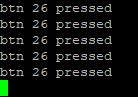
Update: The sensor is definitely working. I redid all my wiring connections today with correct DuPont connectors to attach to the GPIO pins. I'm getting emails from IFTTT when I do filament changes.
Pause just isn't triggering for some reason.
I'm working on a new verison of the plugin with python 3 compatibility and better logging etc, we will need that in order to get some logging and see if the plugin is sending commands to the printer. If it is and the printer is not responding there is no much I can do.
Because of the major refactor for python 3 I'm not going to support this legacy python 2 plugin anymore, and the new version will include better configuration interface and embedded libraries for temperature sensors etc...
Unfortunately it's a balance of how much I can code a day with my day job, masters and other projects, so for now I would recommend either you trying to add some logs on the source code and debug or wait for a new release in a few months.
Thank you for your hard work on this - a key part of the Octoprint functionality. UnfortunatelyI have the same issue. I have set up scripts in octoprint that handle pause and resume very well. I would like my filament sensor to trigger an octoprint 'pause' just like pressing the pause button and my options are set exactly as above. Like Cortexian nothing happens when the sensor triggers in this configuration.
In this set up no command is sent to the printer from the enclosure plugin - all that should be sent is an @pause to octoprint which will handle the rest. I'm sure that is the intended function of the Printer Action (Printer Pause) option.