PWM not functioning as expected #226

Closed
opened 2019-03-26 14:06:08 +00:00 by Tirpitz93 · 2 comments
Tirpitz93 commented 2019-03-26 14:06:08 +00:00 (Migrated from github.com)

Describe the bug
When using PWM to control a fan nothing happens. neither manual nor linked to temperature

To Reproduce
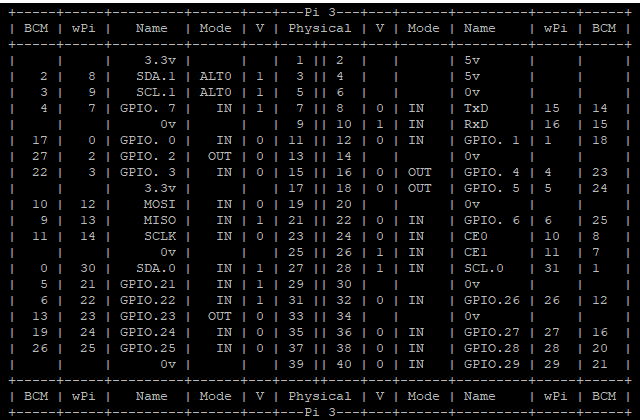
Fan mos module hooked up to 3v3 and gnd, sig to BCM pin 13 (wpi 23).

  1. setting >enclosure Plugin
  2. Output set PWM, set pin number. (set temperature link)
  3. save.
  4. try to change the fan speed.

Expected behavior
fan to speed up or slow down according to manual or automatic controls. currently nothing happens,

Additional context
rPi 3 B.
manually writing the pin up works fine. as does restarting with the correct settings, then it works until any setting is changed.
setting fan to gpio mode also allows fan to work, also setting it as a cooler works to link with temperature.
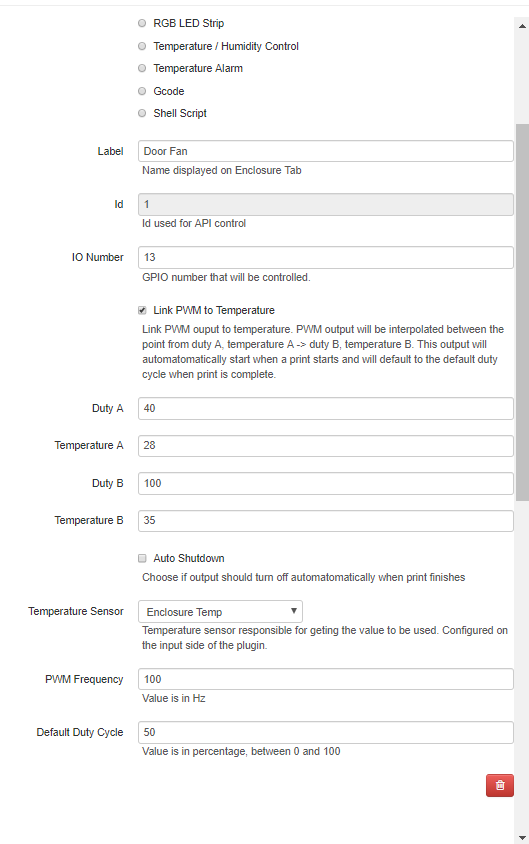
Settings (manual)
image
Settings (temp linked):
image
$gpio readall:
image
log shows options being changed.

`
2019-03-26 13:49:42,933 - octoprint.plugins.enclosure - INFO - Setting GPIO pin 13 as OUTPUT with initial value: 0

2019-03-26 13:49:51,147 - octoprint.plugins.enclosure - INFO - Turning gpio to control temperature on.

2019-03-26 13:50:53,976 - octoprint.plugins.enclosure - INFO - Setting GPIO pin 13 as PWM
`

tab shows that fan should be at 63%
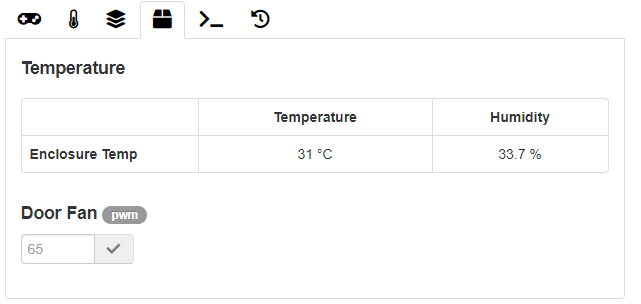
image

**Describe the bug** When using PWM to control a fan nothing happens. neither manual nor linked to temperature **To Reproduce** Fan mos module hooked up to 3v3 and gnd, sig to BCM pin 13 (wpi 23). 1. setting >enclosure Plugin 2. Output set PWM, set pin number. (set temperature link) 3. save. 4. try to change the fan speed. **Expected behavior** fan to speed up or slow down according to manual or automatic controls. currently nothing happens, **Additional context** rPi 3 B. manually writing the pin up works fine. as does restarting with the correct settings, then it works until any setting is changed. setting fan to gpio mode also allows fan to work, also setting it as a cooler works to link with temperature. Settings (manual) ![image](https://user-images.githubusercontent.com/6187560/55003106-a6fe0280-4fcf-11e9-9995-51761c3417fb.png) Settings (temp linked): ![image](https://user-images.githubusercontent.com/6187560/55003207-d9a7fb00-4fcf-11e9-8277-a114d5c44957.png) $gpio readall: ![image](https://user-images.githubusercontent.com/6187560/55003140-b67d4b80-4fcf-11e9-9bbb-48e2fd32d86a.png) log shows options being changed. ` 2019-03-26 13:49:42,933 - octoprint.plugins.enclosure - INFO - Setting GPIO pin 13 as OUTPUT with initial value: 0 2019-03-26 13:49:51,147 - octoprint.plugins.enclosure - INFO - Turning gpio to control temperature on. 2019-03-26 13:50:53,976 - octoprint.plugins.enclosure - INFO - Setting GPIO pin 13 as PWM ` tab shows that fan should be at 63% ![image](https://user-images.githubusercontent.com/6187560/55004149-98184f80-4fd1-11e9-9964-4efacdae9581.png)
Tirpitz93 commented 2019-03-28 13:34:41 +00:00 (Migrated from github.com)

It appears the PWM object is not correctly cleared initialized when settings are changed.
I am working on a fix

It appears the PWM object is not correctly cleared initialized when settings are changed. I am working on a fix
Tirpitz93 commented 2019-03-28 14:59:22 +00:00 (Migrated from github.com)

as a temporary fix I am trying using pwm_instance.start() instead of ChangeDutyCycle() as this ensures it is always properly started. its not pretty but I cant work out where an uninitialized instance is getting through

as a temporary fix I am trying using pwm_instance.start() instead of ChangeDutyCycle() as this ensures it is always properly started. its not pretty but I cant work out where an uninitialized instance is getting through
Sign in to join this conversation.
1 Participants
Notifications
Due Date
No due date set.
Dependencies

No dependencies set.

Reference: Gandalf/OctoPrint-Enclosure#226