Temperature Control - I dont get it #160

Closed
opened 2018-06-21 19:50:21 +01:00 by echloton · 6 comments
echloton commented 2018-06-21 19:50:21 +01:00 (Migrated from github.com)

Hey there,
im having some trouble setting up the temp. control.
What i want: If the temp is above 30°C set GPIO 21 HIGH, if under 30 GPIO 21 LOW.

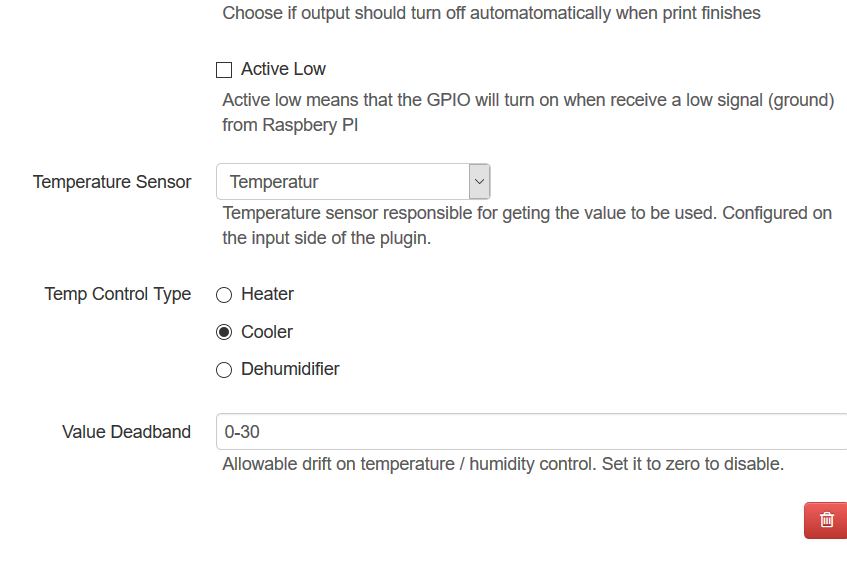
If i manually trigger GPIO 21 it works. I tried Values at Deadband (0-30/30/30-100) but none worked. Temp-Sensor is working and showing Temps (that make sense)

Im quite sure i get something wrong here and theres no bug.
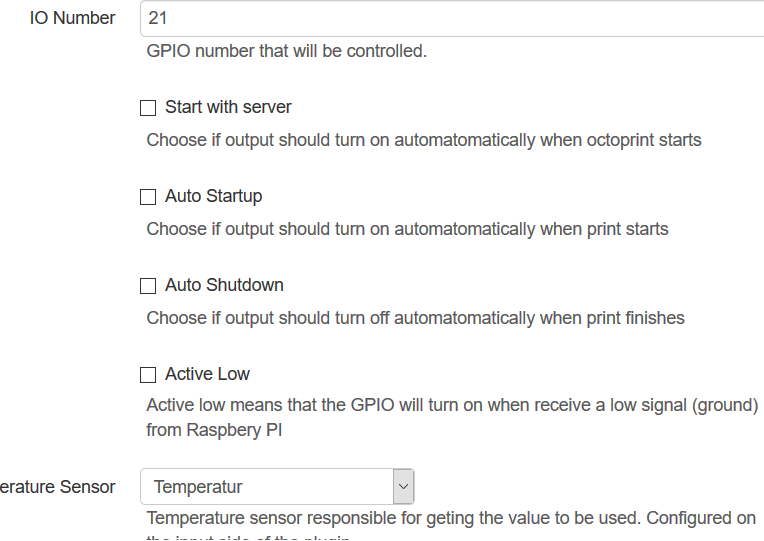
git1
git2
octoprint.log

Best regards

Hey there, im having some trouble setting up the temp. control. What i want: If the temp is above 30°C set GPIO 21 HIGH, if under 30 GPIO 21 LOW. If i manually trigger GPIO 21 it works. I tried Values at Deadband (0-30/30/30-100) but none worked. Temp-Sensor is working and showing Temps (that make sense) Im quite sure i get something wrong here and theres no bug. ![git1](https://user-images.githubusercontent.com/40473109/41739199-a3701376-7594-11e8-8f86-2fa4f81c11b3.PNG) ![git2](https://user-images.githubusercontent.com/40473109/41739200-a38d1098-7594-11e8-931e-77aeda93385c.PNG) [octoprint.log](https://github.com/vitormhenrique/OctoPrint-Enclosure/files/2124955/octoprint.log) Best regards
vitormhenrique commented 2018-06-21 19:52:31 +01:00 (Migrated from github.com)

dead band is just a integer, a value, not a range.
https://en.wikipedia.org/wiki/Deadband

you need to set deadband to zero to get what you want.

dead band is just a integer, a value, not a range. https://en.wikipedia.org/wiki/Deadband you need to set deadband to zero to get what you want.
echloton commented 2018-06-21 20:05:47 +01:00 (Migrated from github.com)

Ok, i have tried that. But Where do i Set the temp at which the pin goes high/low?

Cheers

Ok, i have tried that. But Where do i Set the temp at which the pin goes high/low? Cheers
vitormhenrique commented 2018-06-21 20:08:07 +01:00 (Migrated from github.com)

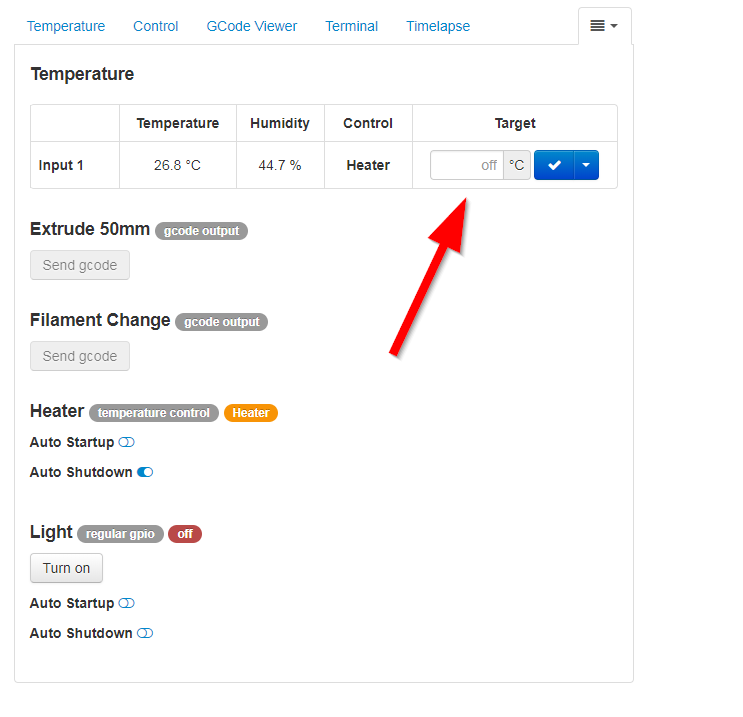
on the enclosure tab, it's going to have a "set temperature" on the grid that displays the temperature.
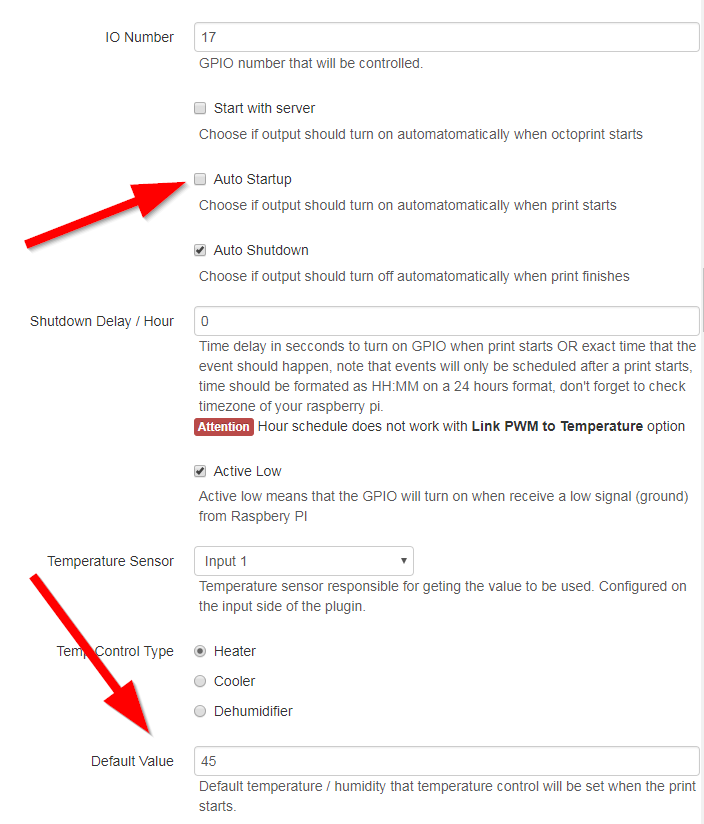
you can also make it auto turn on and off and set a "default" value.

on the enclosure tab, it's going to have a "set temperature" on the grid that displays the temperature. you can also make it auto turn on and off and set a "default" value.
echloton commented 2018-06-21 20:11:41 +01:00 (Migrated from github.com)

Ill try that, thanks!

Ill try that, thanks!
vitormhenrique commented 2018-06-21 20:23:41 +01:00 (Migrated from github.com)

Enclosure tab:
2018-06-21 14_20_49-taz 5 octoprint

If you want to automatically start cooling with the print, change this on the enclosure setting screen.
2018-06-21 14_21_48-taz 5 octoprint

Enclosure tab: ![2018-06-21 14_20_49-taz 5 octoprint](https://user-images.githubusercontent.com/3967383/41740735-89928d2a-755e-11e8-8395-e7b125cb83fe.png) If you want to automatically start cooling with the print, change this on the enclosure setting screen. ![2018-06-21 14_21_48-taz 5 octoprint](https://user-images.githubusercontent.com/3967383/41740734-89753068-755e-11e8-8c06-fa415c5ae7a7.png)
echloton commented 2018-06-21 20:41:38 +01:00 (Migrated from github.com)

Thx alot, worked perfectly! Or works..better.

Thx alot, worked perfectly! Or works..better.
Sign in to join this conversation.
1 Participants
Notifications
Due Date
No due date set.
Dependencies

No dependencies set.

Reference: Gandalf/OctoPrint-Enclosure#160